Monthly
£55per company, per month, including VAT
Pay month to month after your 14-day free trial. No card is needed to start.

CrewQCI
For construction & trade businesses
Sales pipeline and credit control for construction and trade businesses — leads, quotes, contracts, invoicing, applications for payment and retentions in one place, and it chases the money for you. CrewQCI grew out of a working contractor's sales workbook, and it runs that firm's commercial side today.
14 days free · no card neededThen £55/month or £550/year per company, including VAT.
Already on CrewQCI? Read the user guide — online, or as a PDF to keep.
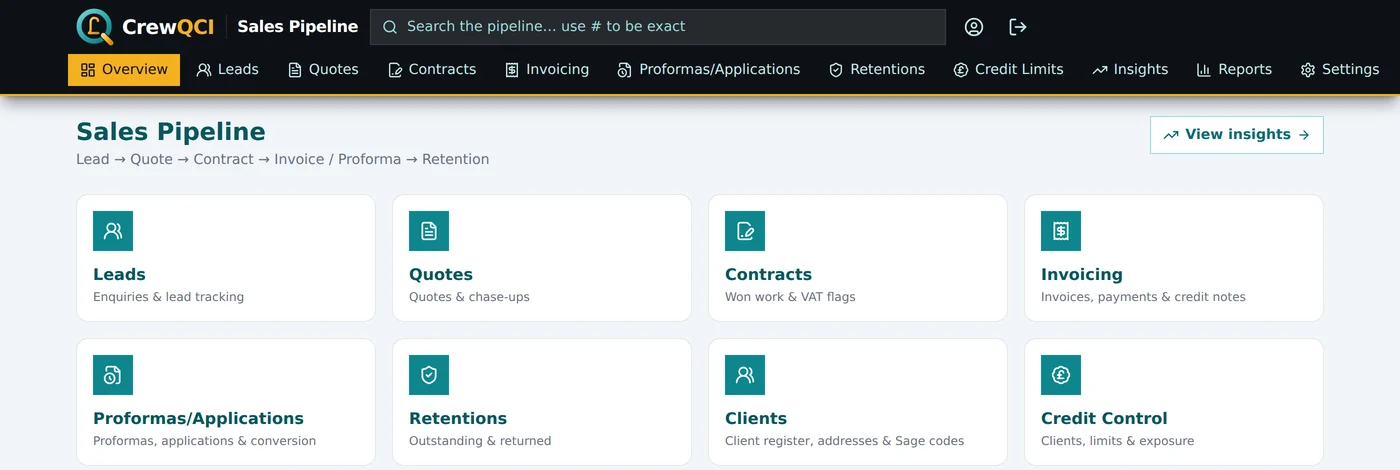
The real CrewQCI overview. Select the screen to take a closer look.
Inside CrewQCI
See how the commercial side fits together, with real screens from the sales and credit-control registers.
A closer look 04 views
CrewQCI, up close.Real screens. The details that make a difference.
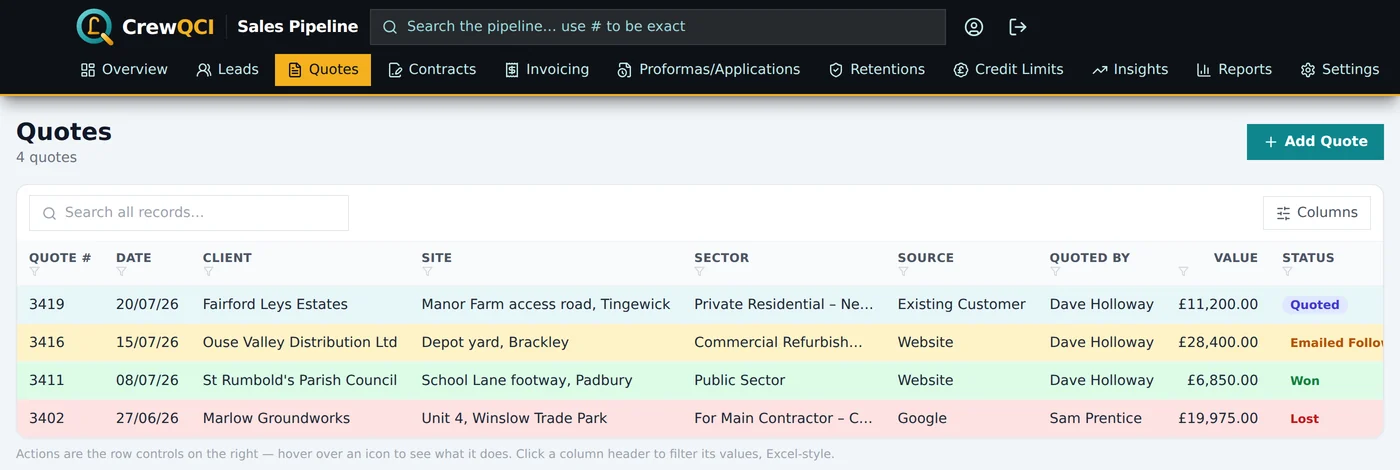
CrewQCI / Quotes
Quote numbers allocate in sequence.
Explore with a click, or use the arrow keys when a topic is selected.
The problem
A quote goes out and nobody chases it. An invoice goes sixty days over because chasing is nobody's actual job. A retention falls due next March and nobody diarises it. A client's balance creeps past the limit you set two years ago and nobody notices until the invoice is already out. None of that happens because anyone is careless — it happens because the quote, the invoice, the retention and the chaser live in four different places, and nothing joins them up.
CrewQCI puts them in one register, so a won quote becomes a contract, the contract becomes documents, and the money owed against it is chased the whole way through — on a ladder you set, without anyone having to remember.
One company-wide price
There is time to run a real month of quoting and invoicing through it before you decide. The price covers the whole company, however many people you invite.
What it does
Leads carry their source, sector and owner, so the follow-up is somebody's job rather than everybody's. Convert a lead to a quote and nothing is re-typed.
Quote numbers allocate in sequence. Statuses run from Quoted through Emailed and Called Follow Up to Won or Lost, colour-coded down the register so anything gone cold is visible from across the office — and a won quote becomes a contract in one click.
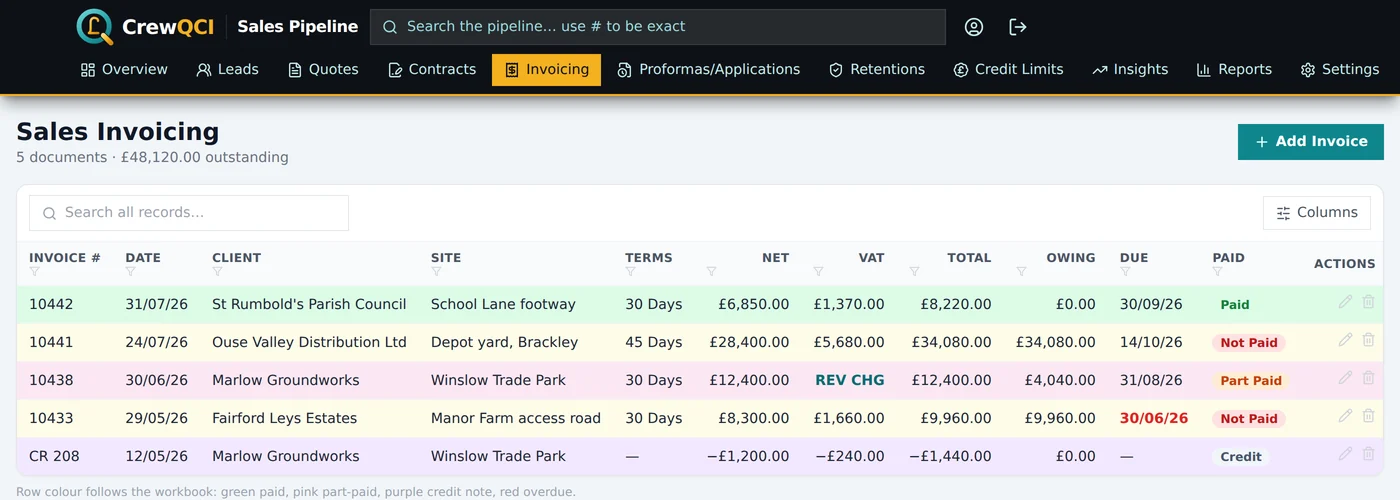
Raise invoices and credit notes against the contract as branded PDFs, emailed under your own company name. Mark a client CIS registered and the domestic reverse charge is applied and worded properly on everything that follows. Every document email is kept, so you can read exactly what a client received and send it again to a different address if the first one was wrong (the resend carries the same PDF with a fresh download link, rather than a rebuilt document).
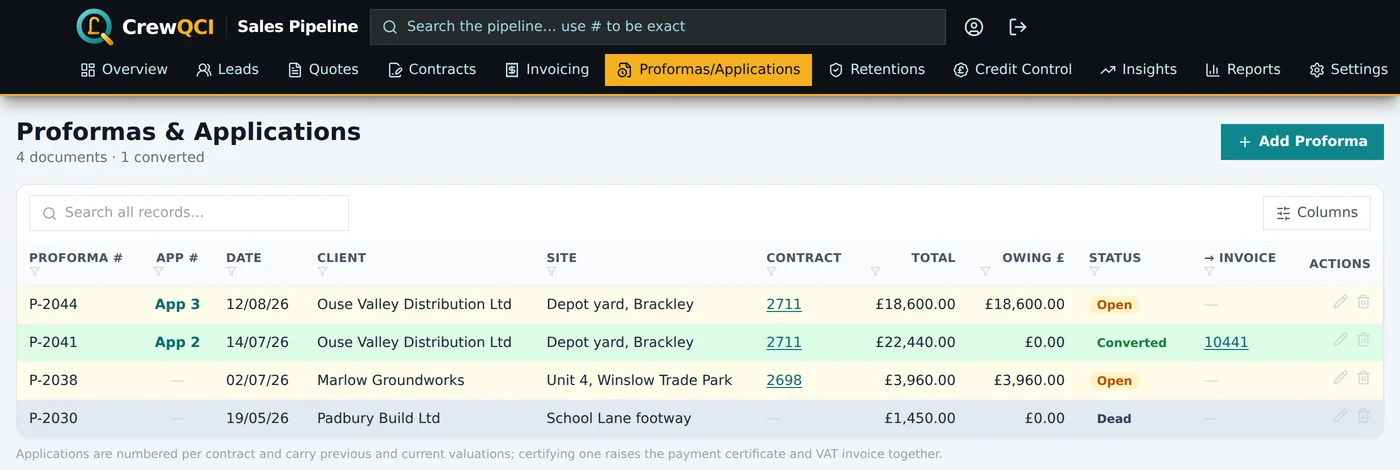
Applications for payment are numbered per contract with previous and current valuations, and certify into a payment certificate and VAT invoice when the money is agreed — the way main-contractor work actually gets paid.
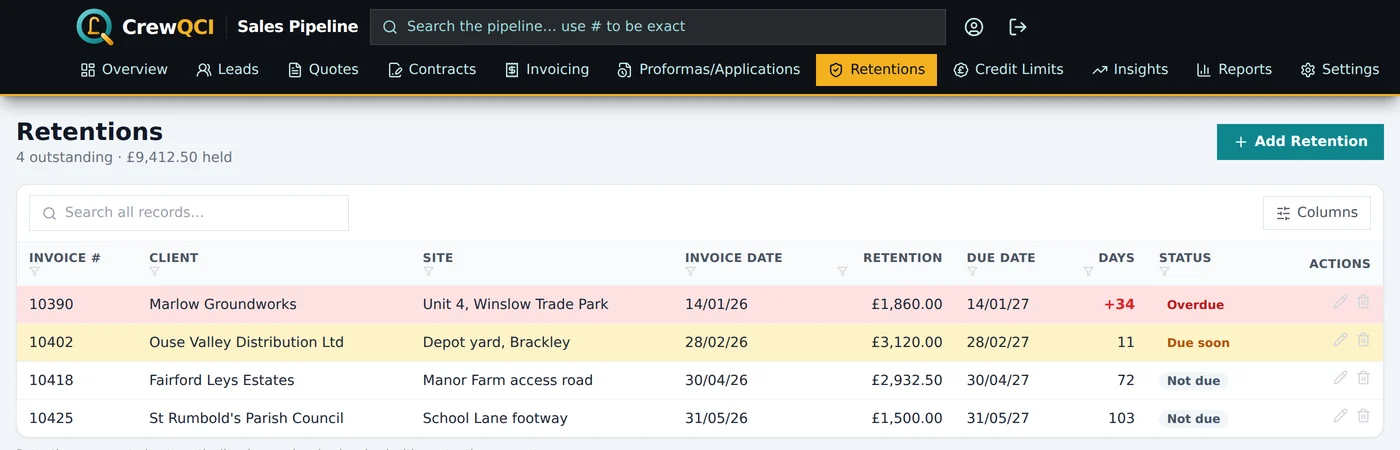
Raise an invoice with a retention percentage and the retention posts itself to its own register with the amount held and the date it falls due, then counts down in front of you — amber as it approaches, red once it is overdue.
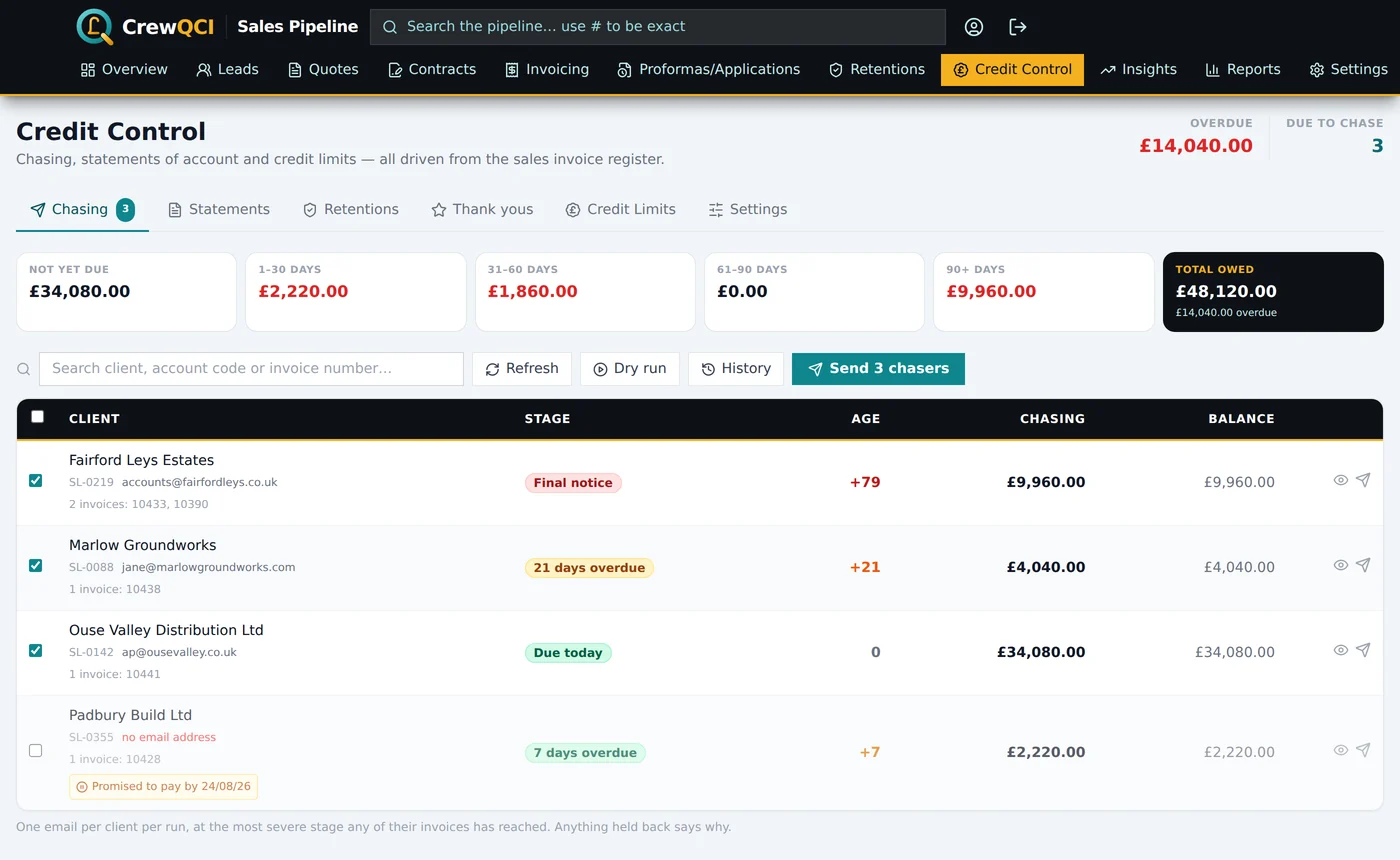
Every open invoice ages from its due date and climbs a ladder you set — a reminder before it falls due, a note on the day, then chasers at 7, 21 and 45 days over. One email per client per run, at the most severe stage they have reached, under your company name. Read any of them before it goes, send a batch by hand, or let the 7am run do it.
And it knows when not to. A client who has promised to pay by Friday is left alone until Friday; so is one on hold, one under your threshold, one already chased this week, and one with no email address on file — each held back with the reason written on the row.
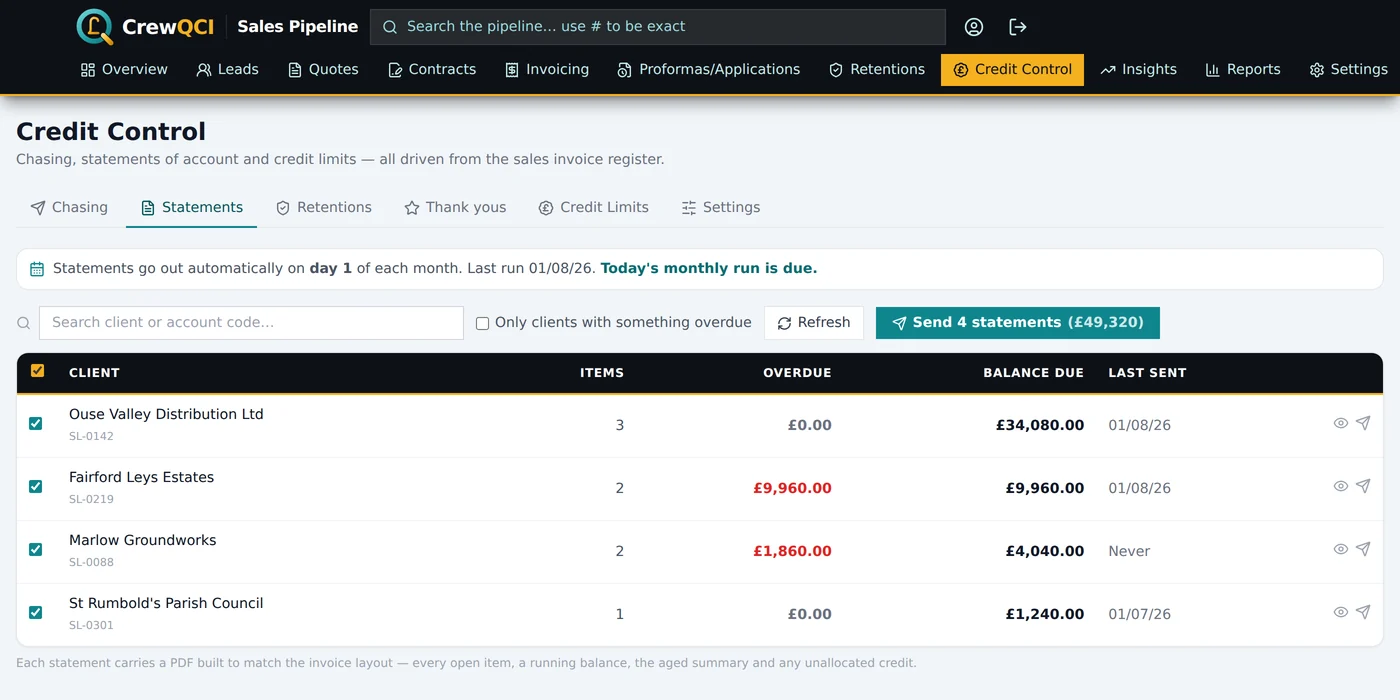
A statement of account PDF per client — every open item, a running balance, the aged summary and any unallocated credit — sent on a day of the month you choose or one at a time. Matured retention gets its own polite, non-escalating release request, and a client who clears their account gets a thank-you with an optional review ask.
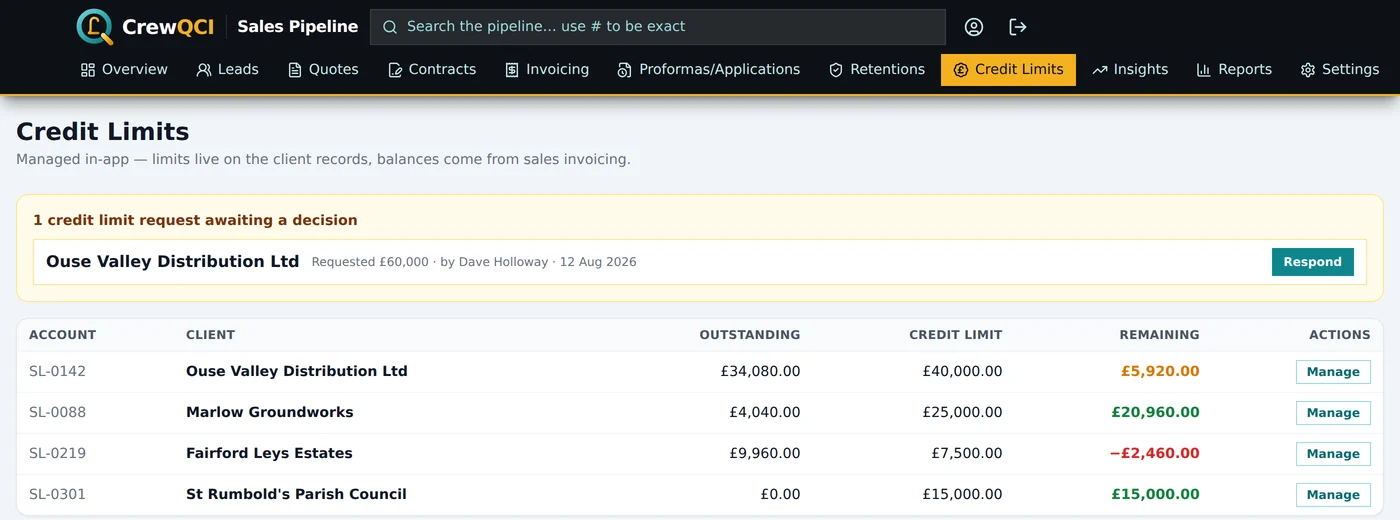
Every client's outstanding balance is computed from the invoice register, net of VAT, and set against the limit you have given them. Staff can request more headroom and an admin approves or declines it, with the decision emailed back.
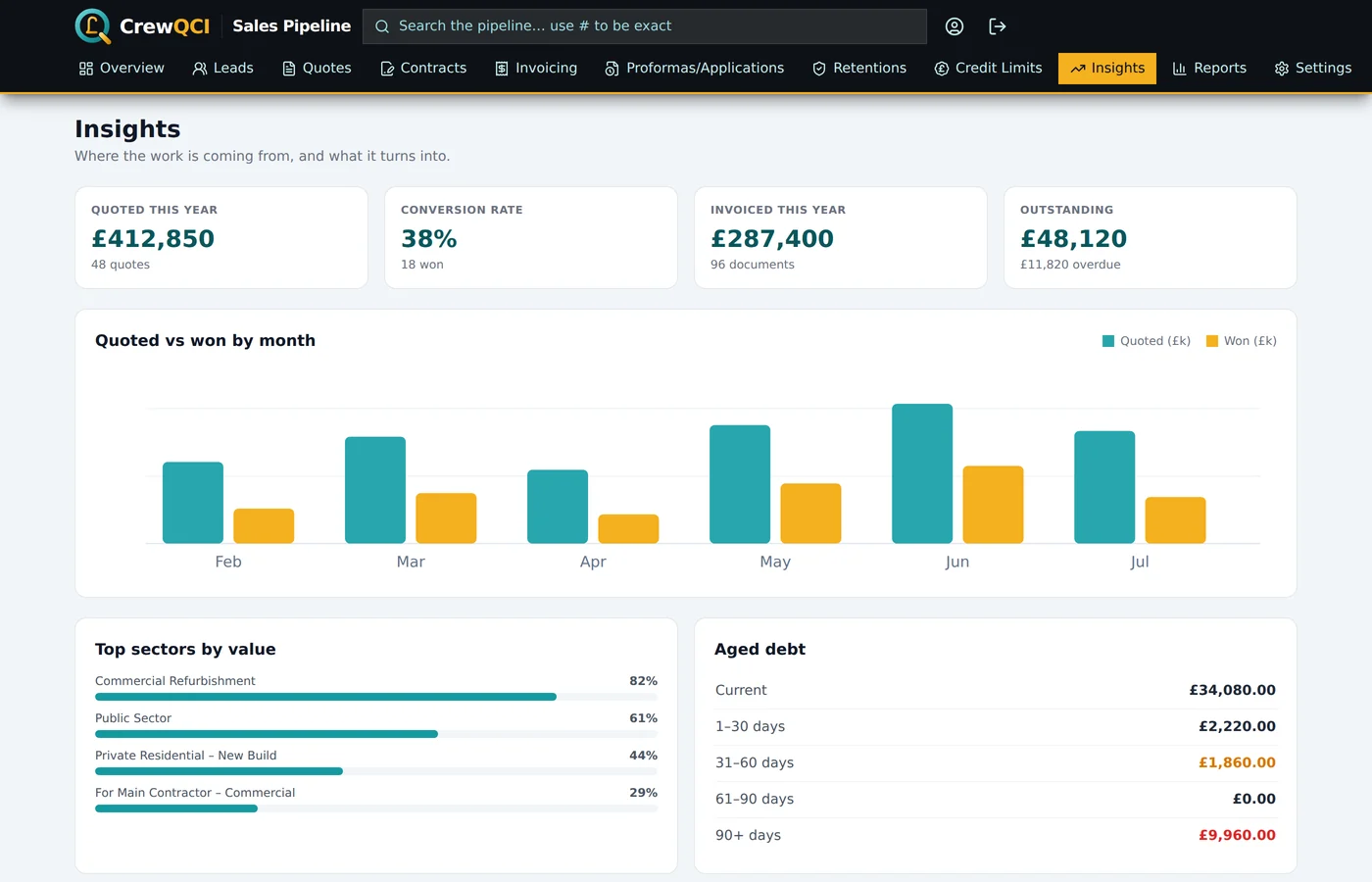
Conversion by sector and source, quoted against won by month, and aged debt taken from the same invoices the documents were printed from — so the report and the register do not disagree. Export to PDF, Excel or CSV, including a Sage-ready sales ledger with nominal codes per sector.
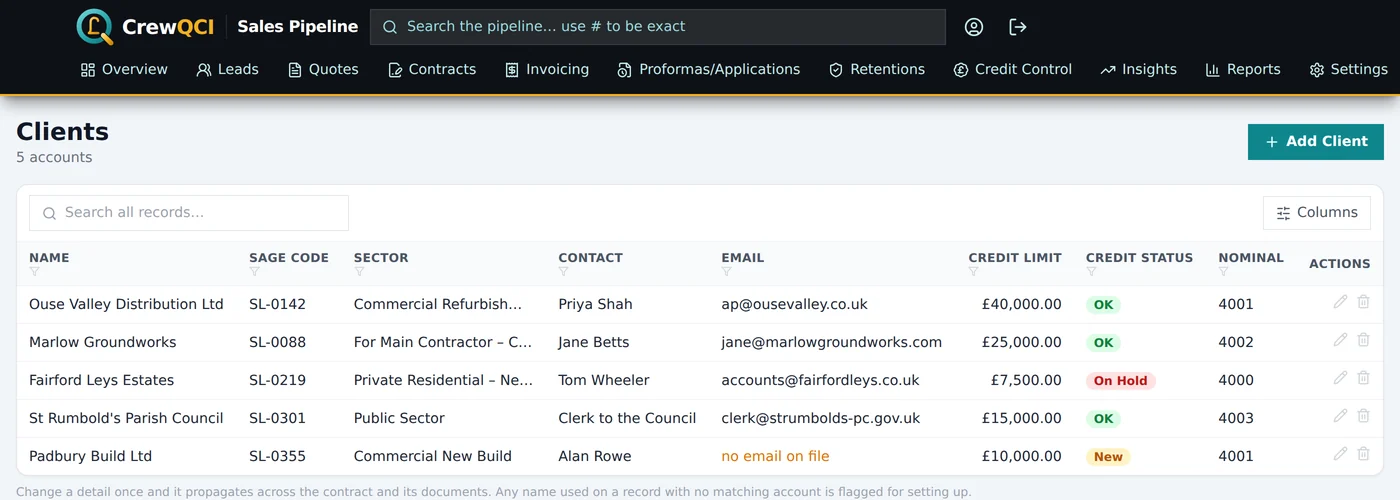
Addresses, contacts, Sage codes, sector and credit limit in one place. Change a detail once and it propagates across the contract and its documents, and any name used on a record with no matching account is flagged for setting up. Search ignores punctuation and spacing, so "A & C Hobbs", "A and C Hobbs" and "A+C Hobbs" all find the same account, whichever way it happened to be typed.
Automatic, carefully
Letting software email your customers about money is a big step, and it is usually the reason people stay on the spreadsheet. So the safeguards came first, and you turn it on in your own time.
While a test address is set, every chaser and statement is redirected to you and logged as a test. Nothing can reach a client, and clearing that field is go-live. If the address is unusable, nothing sends at all rather than falling through to the client.
Ask what today's run would do and it tells you — how many chasers, covering how much, who is held back and why — without sending a thing.
Set the day you switched over and invoices that fell due before it are never chased automatically, so turning it on doesn't fire a final notice at your entire back book.
Every email is written to a log, and that log is what stops a stage firing twice. If it cannot be read, the run refuses to send rather than risk repeating a chaser a client has already had.
CrewQCI or CrewBook?
CrewQCI is the commercial side on its own: leads, quotes, contracts, invoicing, retentions and credit. Choose it if you already have a way of running the work and what you need is control over the selling and the getting-paid.
CrewBook is the whole firm: the same sales pipeline, plus scheduling, crews, plant, materials, wages, job costing and CIS-aware Sage exports — so sales sit against cost per contract without anyone reconciling spreadsheets.
Where it comes from
CrewQCI grew out of the quotes, costs and invoices workbook of a working UK surfacing and groundworks firm — the numbering, the statuses, the row colours and the VAT handling all came straight out of it. That is why it knows what an application for payment is, why CIS reverse charge is a checkbox, and why retentions get their own register rather than a note in the margin.
The difference from the spreadsheet is that it chases, prints, emails and adds up on its own — and two people can be in it at once without one of them overwriting the other.
Peter will walk you through CrewQCI on work shaped like yours, and say if he doesn't think it suits you. Or start the free trial yourself at crew-qci.com. Already a customer? The user guide covers every page, step by step.
Request a demo