Follow the step-by-step Builder guide: nine copyable prompts, a small AdminNote feature, private setup instructions, troubleshooting and a downloadable test record.
I didn’t start this job wanting to build an authentication system. I wanted a straightforward answer to a straightforward question: if somebody gets hold of an administrator’s password, can they get into the admin side of the app?
For Keystone, that mattered. It’s an app for a security business, bringing together people, properties, patrols and office work. The people using it have different jobs and need different access. The office needs more authority than a guard checking their next shift or a client reading a report.
Base44 had already done the sign-in plumbing. The extra requirement was to make administrative access depend on my approval and an authenticator check. Guards and clients should still be able to use the sign-in options configured for them.
Start with what you need to prevent
The first conversation was about Microsoft accounts and MFA. That is a reasonable place to start, but “they sign in with Microsoft” and “our app has verified a second factor for this admin session” are different claims.
We needed to answer the second one. I kept the platform login and added a separate check before the app would do administrative work. This is an application-level authenticator check. It is not Microsoft Conditional Access or a claim that a particular Microsoft tenant performed MFA.
I use AI coding tools to help build these apps. This was a good example of where I still have to be specific about the result I want. “Add MFA” leaves quite a lot open. “A signed-in person without a valid second-factor check must not be able to read or change admin data” gives us something we can test.
- 01Sign inBase44 identifies the account.
- 02Get approvedThe owner authorises admin access.
- 03VerifyThe person uses their authenticator.
- 04Do the workThe backend checks each privileged request.
The screen was the easy part
You can put a six-digit-code screen in front of a dashboard quite quickly. But the browser also talks to the database and backend functions. If those still accept an ordinary admin login without checking MFA, the new screen can be skipped.
So the important change was to move privileged reads and writes through checked backend functions, and remove the old direct admin access to the relevant application records. A hidden menu and a redirect are useful for navigation. They do not settle what a person is allowed to do.
For a backend-only security entity, the direct-access rules look like this:
Direct-access rules · backend-owned security entity
"rls": {
  "read": false,
  "create": false,
  "update": false,
  "delete": false
}
That example is for a security record, not a rule to paste across every table without a plan. Guards and clients have their own permitted operations. Denying direct access also means providing the correctly authorised backend route for legitimate work.
The platform-managed user record is another boundary to check separately. I would not tell someone that changing a few custom entity rules removes every permission the platform can grant.
Approve the person before they enrol
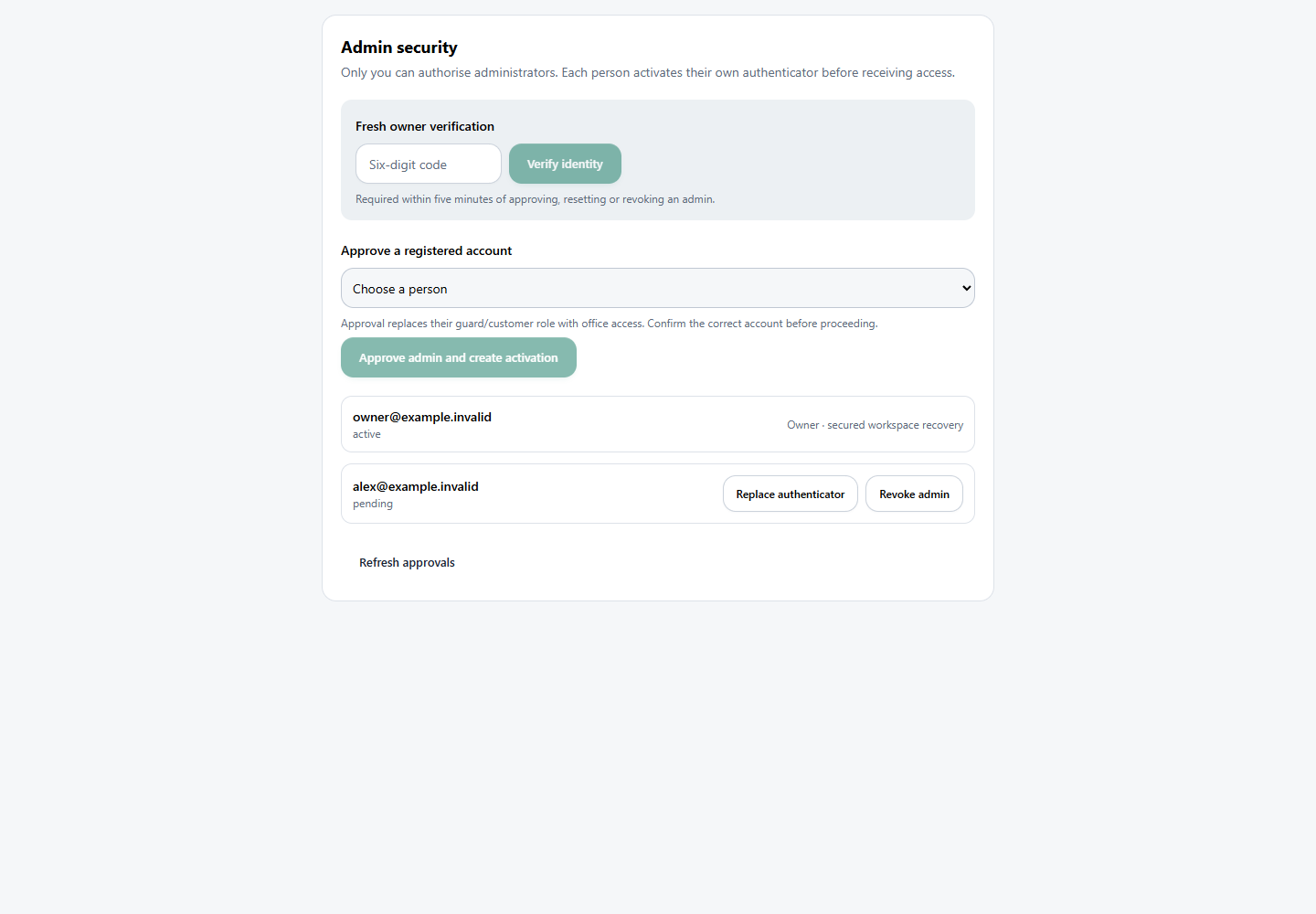
I wanted to be the person who authorises new administrators. After approval, each person sets up their own authenticator. That sounds simple, but the first setup needs protection too.
If knowing the password is enough to enrol the first authenticator, somebody with a stolen password could enrol theirs. Our approval flow therefore produces a separate, single-use activation credential. I give that to the person through a separately verified channel. It lasts 15 minutes.
The person then scans a QR code and confirms a code from their authenticator. The QR is generated inside the app; it is not sent to an external QR-image service. The authenticator secret is encrypted using a dedicated backend key and cryptographically bound to the account it belongs to.
The admin approval record is backend-owned. It is separate from ordinary profile fields, because something a person can edit about themselves cannot be the authority for approving them.
A code opens a verified session, not permanent access
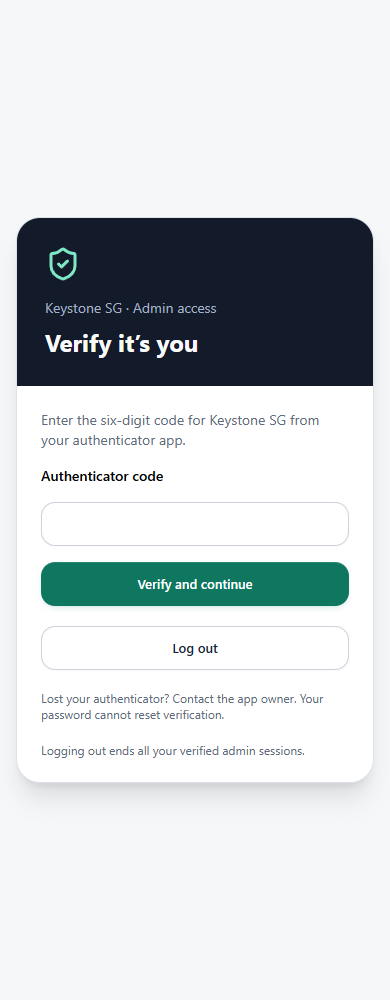
After a correct authenticator code, the server issues a random proof token. The browser carries it on admin requests; the server stores its hash. The check ties it to the authenticated user, their current login token and the current version of their admin verification.
These are the timings in the implementation at the time of writing:
Current timings · TypeScript
const MFA_SESSION_MS = 8 * 60 * 60 * 1000;
const MFA_FRESH_MS = 5 * 60 * 1000;
const ACTIVATION_MS = 15 * 60 * 1000;
Eight hours is the maximum life of that admin proof, not a promise that everyone only types one code a day. A new login, signing out or a reset can require another check sooner. Changing admin security requires verification within the last five minutes.
What the server checks
- The account is approved and active.
- The proof belongs to this account and login session.
- It has not expired or been revoked.
- Its verification version still matches the account.
- The operation has the permissions it needs.
Signing out rotates that version, so the person’s other admin proofs stop matching too. Resetting or revoking access invalidates them in the same way.
That stops further authorised requests. It cannot pull back a file somebody has already downloaded, and an already-issued file link has its own expiry.
The shape of a protected operation is deliberately boring:
Illustrative backend sequence · supporting helpers omitted
const identity = await sdk.auth.me();

await requireAdminMfa(
  req,
  identity,
  sdk.asServiceRole.entities,
  { owner: true, fresh: true }
);

// Only now validate and perform the owner-only operation.
// Never accept the caller's identity from the request body.
This is an illustrative excerpt, not a complete MFA implementation. requireAdminMfa is our own helper, not a Base44 API. It has to validate the stored proof; the business operation still needs its own scope and input checks. Service-role access is powerful, so the backend must never become an unrestricted proxy for whatever the browser asks it to do.
The details that needed attention
Keep the decision on the server
An early version used a build-time flag to decide whether the browser installed the MFA adapter. That was one more setting that could differ between local development and the published app. The current client always installs the adapter and asks the server what verification is required.
The backend still has an explicit activation setting. If that is off, it is off. Removing a frontend switch is not a substitute for checking deployed backend configuration and access rules together.
Read the request body once
Some operations parse their JSON before checking MFA. A request body is a stream: you cannot assume it will be there to read a second time. We either extract the proof before consuming the body or pass the already-parsed proof to the helper. File uploads and nested function calls need the same care.
Don’t let two requests spend the same code
The implementation limits credential attempts to five per minute and records accepted time-steps to prevent code reuse. Those counters are no use if two simultaneous requests can overwrite each other.
State changes therefore match a revision number and increment it. A losing request gets a conflict instead of silently replacing the winner’s work:
Conditional update · adapted from the account helper
const result = await accounts.updateMany(
  { id: row.id, user_id: row.user_id, revision: row.revision },
  { $set: { ...patch, revision: row.revision + 1 } }
);

if (result?.success !== true ||
    result.updated !== 1 || result.has_more !== false) {
  throw new Error("Verification changed. Please try again.");
}
This is the expected store contract, not proof that a hosted database fulfils it. The concurrency probe has to run against the actual platform. A rate-limit response and two successful conflicting updates are different failures; record what happened rather than treating every failed probe as broken atomicity.
Give people a recovery route
There is no password-only “reset my authenticator” shortcut. Ordinary resets go through the owner. Owner recovery uses the separately protected Base44 workspace and a documented procedure. I already use Google MFA for that workspace login.
The recovery procedure keeps the existing encryption key. Replacing it to fix one person’s authenticator would create a problem for everyone else. This is the sort of detail I want written down before I need it.
I want to test the request that should fail
It is satisfying to enter a code and watch the dashboard open. The more useful test is to stop before entering it and try to fetch the same information directly.
The checks I want recorded include a missing proof, a proof from another login, an expired proof, revocation, competing verification attempts and interrupted enrolment. They also include normal work: reports, invoices, uploads and the guard and client journeys. A security change that breaks the working day has not finished the job.
MFA is now running in the app and I have confirmed it working. That is different from an independent security certification or a claim that every possible platform access path has been audited. The screenshots here illustrate the interface; they are not evidence of a production penetration test.
Be clear about what you’ve built
This approach adds an authenticator requirement to administrative work. It does not force Microsoft sign-in, approve every new guard or client account, or replace the app’s normal data permissions. Those are separate requirements.
Authenticator codes can also be phished. NIST explicitly distinguishes OTPs from phishing-resistant authentication. If phishing resistance is the requirement, that should change the design rather than the wording on the login page.
I’m not suggesting every Base44 app should build its own MFA layer. Where a managed identity solution can meet the requirement, assess that first. In this case the useful lesson was to follow the whole path from a person signing in to the data they could reach.
The code screen is what the user sees. Whether a request is allowed through is what I need to be able to explain.
Code and further reading
The examples are adapted from our implementation and are deliberately incomplete. Timings and behaviour were checked against the source on 13 September 2026. Platform capabilities can change.